Guide
How to Use
Book loads with AI Dispatcher in four simple steps.
- Install the Chrome ExtensionInstall the AI Dispatcher Chrome extension and click on it to enable it.
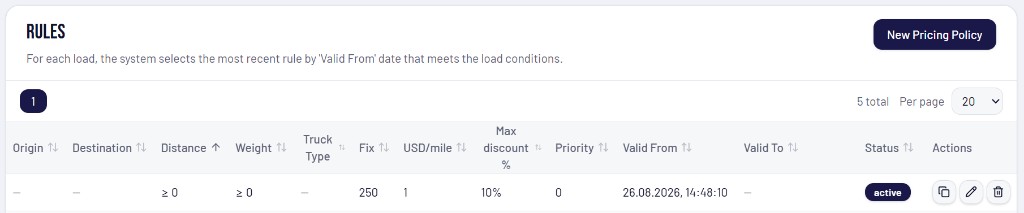
- Set Up Your Pricing PolicyConfigure your negotiation rules in Pricing Policies, including:
- Target rate
- Margin
- Maximum discount AI can offer
For new users, the default pricing is set to $1 per mile + $250 fixed. You can change it.
AI will use these settings during every broker negotiation.
- Select a Load
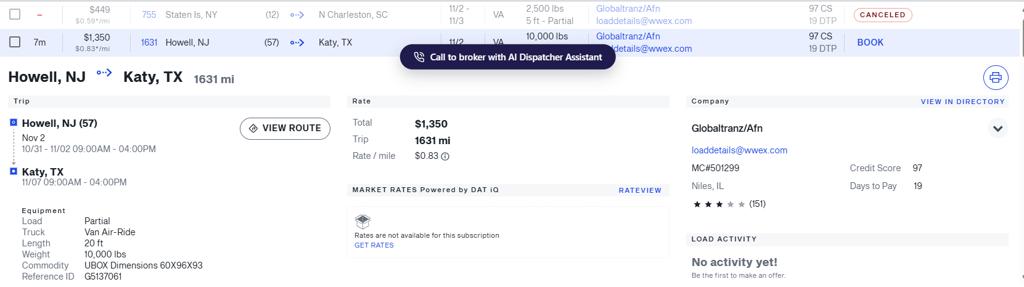
In your loadboard, find the load you want to book and open its details.
Click the button on load cardCall to broker with AI Dispatcher Assistantor click Call to broker in the Chrome extension menuYou can send as many loads as you want. Whether it's one load or one dozens, AI Dispatcher queues them automatically and starts calling brokers пока не забронирует груз или не прозвонит все грузы.
- AI Takes It From Here
For every submitted load, AI Dispatcher will:
- Call the broker
- Retry automatically if the line is busy
- Negotiate using your pricing policy
- Book the load when an agreement is reached
- Update the status automatically
You can join the conversation and take over at any time while AI is talking to the broker.
If the broker never answers, AI stops trying after the configured number of attempts and marks the load as No Answer.
Need to update company details first? Open your profile.
Any questions? Email support@aidispatcher.online